

Download Windows Anonymous Browser – Free, Secure & Private Browsing Tool
In an age where every click can be tracked, the demand for tools that safeguard online anonymity has never been higher. Windows Anonymous Browser answers that call with a dedicated, free application built specifically for Windows users who refuse to compromise on privacy. The software masks your IP address, encrypts your traffic, and strips away identifying headers, allowing you to surf the web without leaving a digital footprint.
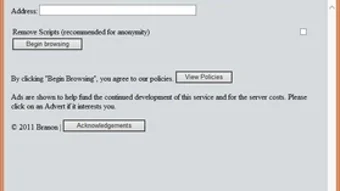
While its core mission is privacy, the browser also strives to keep the experience familiar—featuring a clean navigation bar, standard back‑forward controls, and a lightweight design that runs smoothly on both older and newer Windows installations. Though you will encounter a few ads placed at the top of the window, they are modest enough not to distract from the primary goal of discreet browsing. If you are looking for a straightforward, no‑frills solution to protect your identity online, Windows Anonymous Browser offers a compelling blend of anonymity, simplicity, and cost‑free accessibility.
Key Features That Set Windows Anonymous Browser Apart
- IP Masking & Proxy Integration: Automatically routes traffic through secure proxy servers, ensuring your real IP address never reaches the destination website.
- Built‑In Tracker Blocker: Blocks common web trackers, cookies, and fingerprinting scripts, reducing the chances of being profiled.
- Lightweight Engine: Uses a stripped‑down rendering engine that consumes minimal RAM and CPU, ideal for older hardware.
- Simple UI: Minimalist navigation bar with essential buttons (Back, Forward, Refresh, Home) to keep the learning curve flat.
- Automatic Updates: Checks for the latest security patches on launch, guaranteeing you stay protected against emerging threats.
- Free of Charge: No subscription fees, no hidden costs—completely free for personal use.
- Ad Placement (Non‑Intrusive): Displays modest advertisements at the top of the window; they do not interfere with browsing or compromise privacy.
- Secure HTTPS Enforcement: Forces HTTPS connections whenever possible, adding an extra layer of encryption.
Installation & Usage: Step‑by‑Step Guide
Downloading the Installer
Begin by visiting the official website or a trusted software repository. Click the prominent “Download for Windows” button, which will fetch the .exe installer to your default download folder. Because the application is free, there is no need to enter payment details or create an account.
Running the Installer
Double‑click the downloaded file. Windows may prompt you with a User Account Control (UAC) dialog; click “Yes” to grant the necessary permissions. The installer follows a wizard format: accept the End‑User License Agreement (EULA), choose an installation directory (the default location works for most users), and decide whether to create a desktop shortcut. Once you confirm, the installer extracts the files and registers the browser as a default application if you opt in.
First Launch & Configuration
After installation, launch the browser from the Start menu or desktop shortcut. On first run, a brief tutorial appears, highlighting the privacy features and showing where the ad banner sits. You can customize proxy settings—either rely on the auto‑selected servers or manually input a preferred proxy address. For most users, the automatic mode provides sufficient anonymity without extra configuration.
Everyday Browsing
Using Windows Anonymous Browser feels like any other web browser: type a URL into the address bar, press Enter, and watch the page load without exposing your IP. The built‑in tracker blocker works silently in the background, and the HTTPS enforcement ensures encrypted connections whenever possible. If you encounter a site that refuses to load due to strict security policies, you can temporarily disable the proxy via the settings menu, browse, then re‑enable it for continued anonymity.
Compatibility, Pros & Cons
Operating System Support
Windows Anonymous Browser is compatible with Windows 10, Windows 11, and older versions such as Windows 7 and Windows 8. The application runs on both 32‑bit and 64‑bit architectures, making it a versatile choice for legacy machines still in use within corporate or personal environments.
Pros
- Completely free with no hidden subscription fees.
- Effective IP masking and built‑in proxy system.
- Lightweight design that runs smoothly on older hardware.
- Automatic security updates keep the browser current.
- Simple user interface that anyone can navigate.
- HTTPS enforcement adds an extra security layer.
Cons
- Ads are displayed at the top of the window, which some users may find distracting.
- Lacks advanced features such as tab groups, extensions, or built‑in VPN.
- Limited customization options compared to mainstream browsers.
- No native support for macOS, Linux, Android, or iOS platforms.
Frequently Asked Questions (FAQ)
Is Windows Anonymous Browser really free?
Yes, the application is 100 % free for personal use. There are no hidden fees, subscription plans, or mandatory purchases. The only revenue source is the modest advertising banner displayed at the top of the browser window.
How does the browser hide my IP address?
Windows Anonymous Browser routes all outgoing traffic through a network of secure proxy servers. These proxies replace your real IP address with a temporary one, making it virtually impossible for destination websites to trace the request back to your machine.
Can I use the browser on Windows 7?
Yes, the software supports Windows 7, Windows 8/8.1, Windows 10, and Windows 11. Both 32‑bit and 64‑bit editions are covered, so older PCs can still benefit from its privacy features.
Do the ads compromise my privacy?
The ads are displayed locally within the browser UI and are not served by third‑party tracking networks. They do not collect personal data or interfere with the proxy’s IP‑masking functionality, so your anonymity remains intact.
Is there a way to block the ads?
Currently, the free version does not offer an ad‑removal option. However, you can upgrade to the premium “No‑Ads” package (available on the developer’s site) for a one‑time fee, which disables the banner while preserving all privacy features.
Conclusion & Call to Action
For Windows users who place privacy at the forefront of their browsing habits, Windows Anonymous Browser delivers a no‑cost, straightforward solution that masks IP addresses, blocks trackers, and enforces HTTPS—all within a lightweight interface. While the presence of a top‑screen ad banner may be a minor annoyance, it does not diminish the core value proposition: secure, anonymous web access without the overhead of subscription fees or complex configuration. If you’re ready to protect your digital footprint without sacrificing performance, download Windows Anonymous Browser today and experience a more private web experience.







